Guide
Attendance List for Clubs: Go Digital, Ditch the Paper

Unypan Blog ·

The paper list gets passed around, three people forget to sign in, the goalkeeper’s handwriting is illegible, and by the end of the season the list from March 12th is completely missing. Sound familiar?
Attendance tracking in clubs is more than just a formality. It serves as proof for insurance in case of accidents, as a planning tool for coaches, and as documentation for sports associations. Yet many clubs still rely on paper or improvised solutions.
In this article, we’ll show you three methods to track attendance digitally in your club and which solution fits your day-to-day operations best.
Why Paper Attendance Lists Are Outdated
Paper was the standard for decades. But let’s be honest: in a time where we make bank transfers on our phones and store shopping lists in the cloud, a handwritten attendance sheet is no longer appropriate.
❌ 5 reasons why paper attendance lists are problematic:
- Risk of loss: Lists get lost, get wet, or end up in the trash
- Illegibility: Handwriting is often impossible to decipher. Who signed there?
- No analysis: Who attended how often? Impossible to answer with paper without counting for hours
- Privacy issues: An openly displayed list with names violates data protection. Anyone can see other members’ data
- No real-time overview: The coach only knows who’s coming once practice starts. Planning? Impossible
Why Attendance Tracking Actually Matters
Many clubs underestimate the importance of proper attendance documentation:
- Insurance protection: In case of an injury during practice, you need to prove that the person was actually present. Without a list, things get complicated.
- Training planning: How many players are coming today? Can I run a scrimmage or do I need to adjust my plan?
- Fairness & motivation: Those who show up regularly should get priority in the lineup. Without data, it’s just a gut feeling.
- Association requirements: Some sports associations require attendance records for funding or license renewals.
3 Methods: Excel, Google Forms, or a Club App
There are different ways to track attendance digitally. We compare the three most common methods.
Method 1: Excel Spreadsheet
The classic among digital solutions. A table with names in the rows and dates in the columns.
Pros:
- Free (if you already have Office)
- Flexible and customizable
- Most people know Excel
Cons:
- Only one person has the current version, version chaos is inevitable
- No mobile access on the field (or only with difficulty)
- No automatic analysis or statistics
- Must be maintained manually: every session, every member by hand
Verdict: Better than paper, but far from a modern solution. Maybe still manageable for clubs with 10 members, but beyond that it quickly becomes chaotic.
Method 2: Google Forms / Online Forms
An online form that members fill out before or after practice.
Pros:
- Free
- Mobile-friendly
- Automatic summary of responses
Cons:
- Privacy concerns: Data is stored on US servers (Google) and not recommended for official club data
- Must be created or adjusted for every session
- No integration with member management
- Looks unprofessional and is cumbersome for members
Verdict: A quick workaround, but not sustainable. The effort of creating a new form for every practice session is too high in the long run.
Method 3: Club App with Integrated Attendance Tracking
A specialized app that automatically links attendance with the event calendar.
Pros:
- Attendance list is automatically generated for every event
- Mobile-friendly, usable right on the field
- Privacy-compliant (with EU-based providers)
- Automatic statistics and analysis
- Integration with member management and communication
Cons:
- Cost (though many providers offer a free tier)
- All members need to install the app
Verdict: The most professional and time-saving solution. Once set up, everything runs automatically.
Comparison at a Glance
| Criteria | 📊 Excel | 📝 Google Forms | 📱 Club App |
|---|---|---|---|
| Cost | Free | Free | Freemium |
| Mobile-friendly | ❌ | ✅ | ✅ |
| Privacy-compliant | ⚠️ Partially | ❌ | ✅ |
| Automatic statistics | ❌ | ⚠️ Basic | ✅ |
| Event integration | ❌ | ❌ | ✅ |
| Effort per session | High (manual) | High (recreate each time) | None (automatic) |
How Digital Attendance Tracking Works in Unypan
With the Unypan club app, attendance tracking runs on autopilot. Here’s how it works, step by step.
Step 1: Create an event, the list is generated automatically
As soon as you create an event in the club calendar (e.g. “Practice Tuesday 6:00 PM”), an attendance list is automatically created for all invited members. No manual setup, no templates. It just happens.
Step 2: Members respond
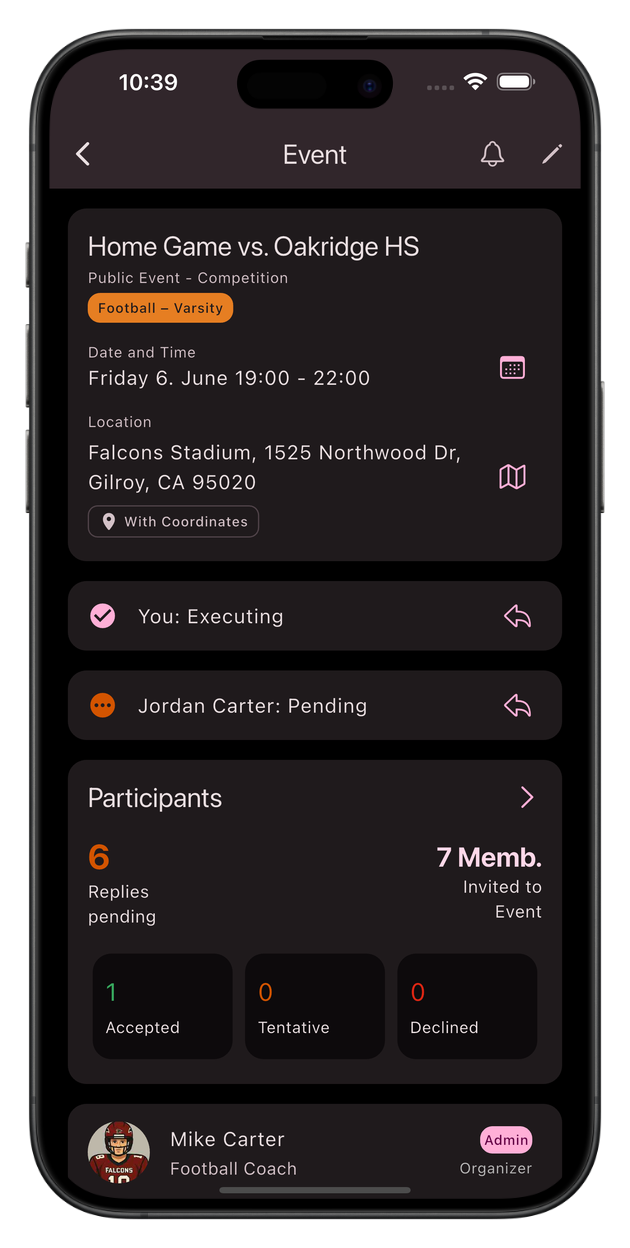
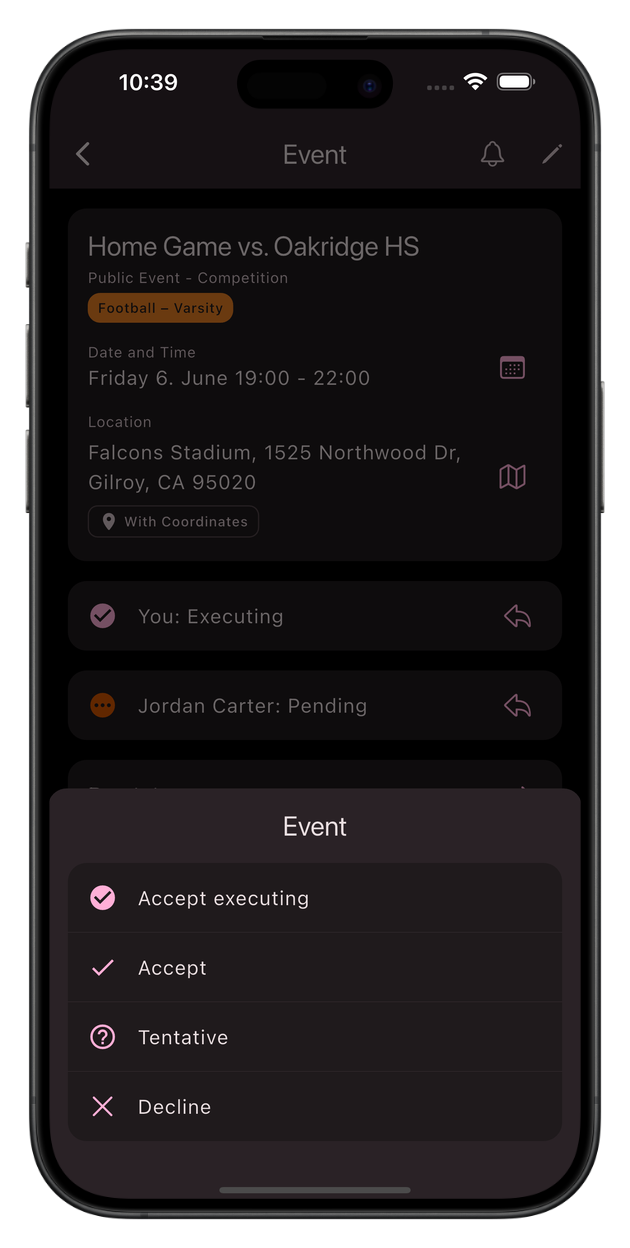
Your members receive a notification and can accept or decline directly in the app. The smart part: attendance is automatically recorded based on their responses:
- Accepted → marked as “Present”
- Declined → marked as “Excused”
- No response → marked as “Absent”
This way, the coach already has an overview before practice of how many players will show up.
Step 3: Coach adjusts as needed
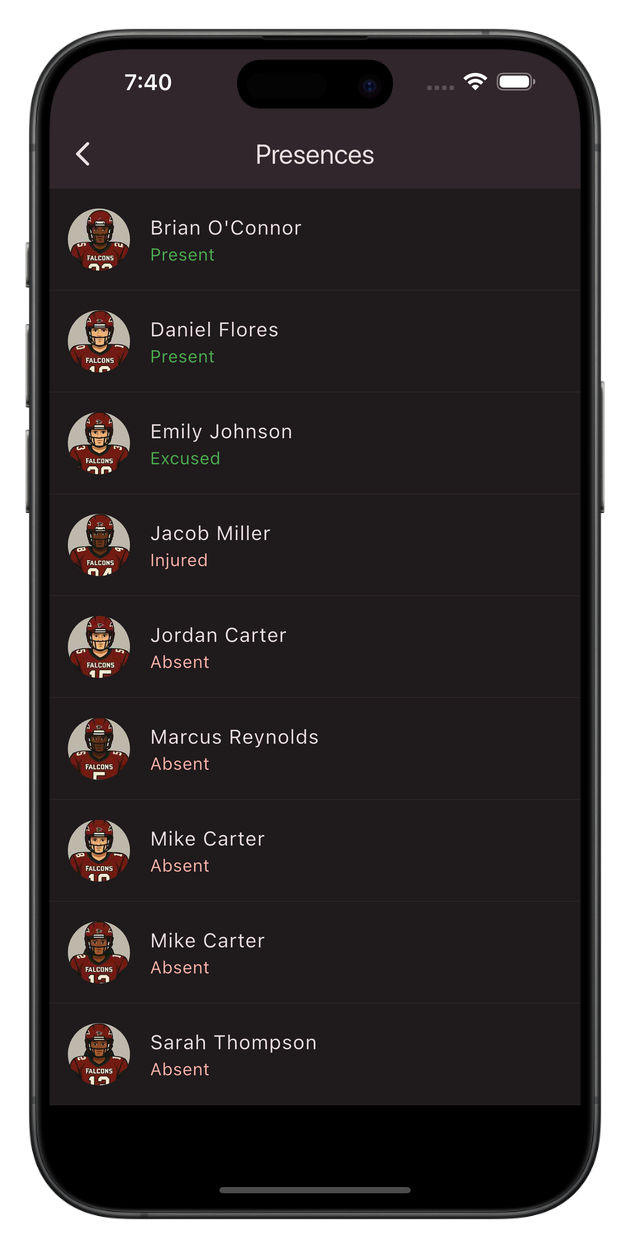
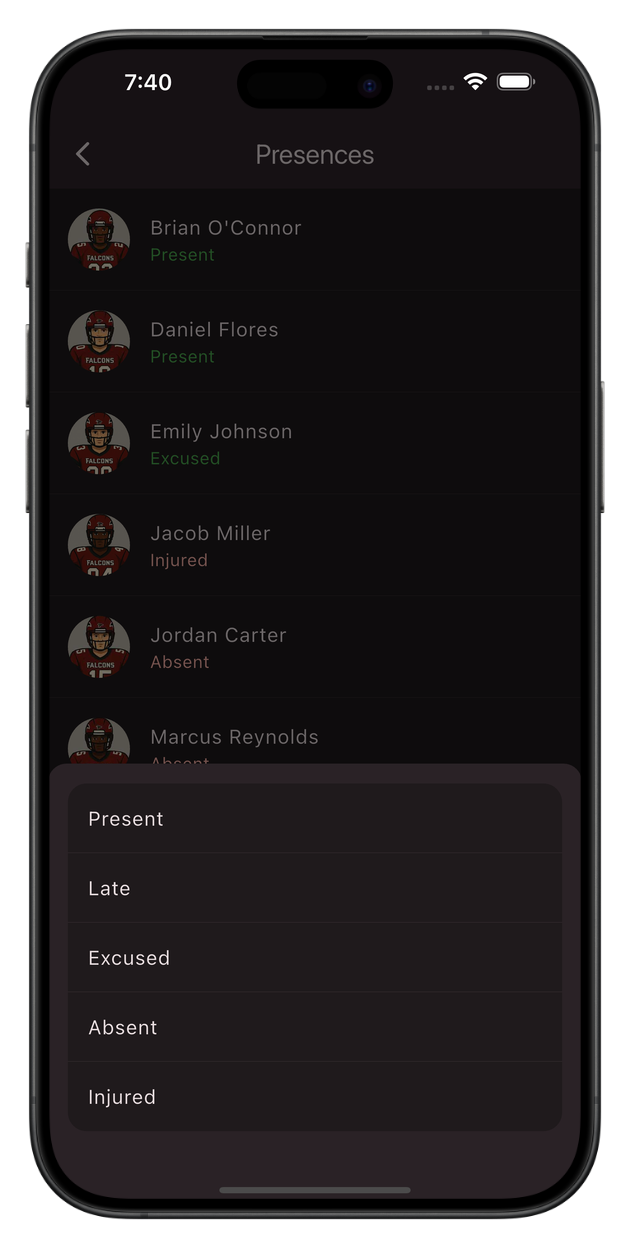
On site, the coach can adjust attendance with just a few taps. Because sometimes someone accepts but doesn’t show up, or the other way around. The following statuses are available:
Present
Late
Excused
Absent
Injured
Step 4: Automatic Statistics
After every event, the attendance statistics are automatically updated. You can see at a glance:
- Who attended how often?
- How has participation developed over the season?
- Who is frequently absent?
No manual analysis, no Excel formulas. Everything happens automatically in the background.
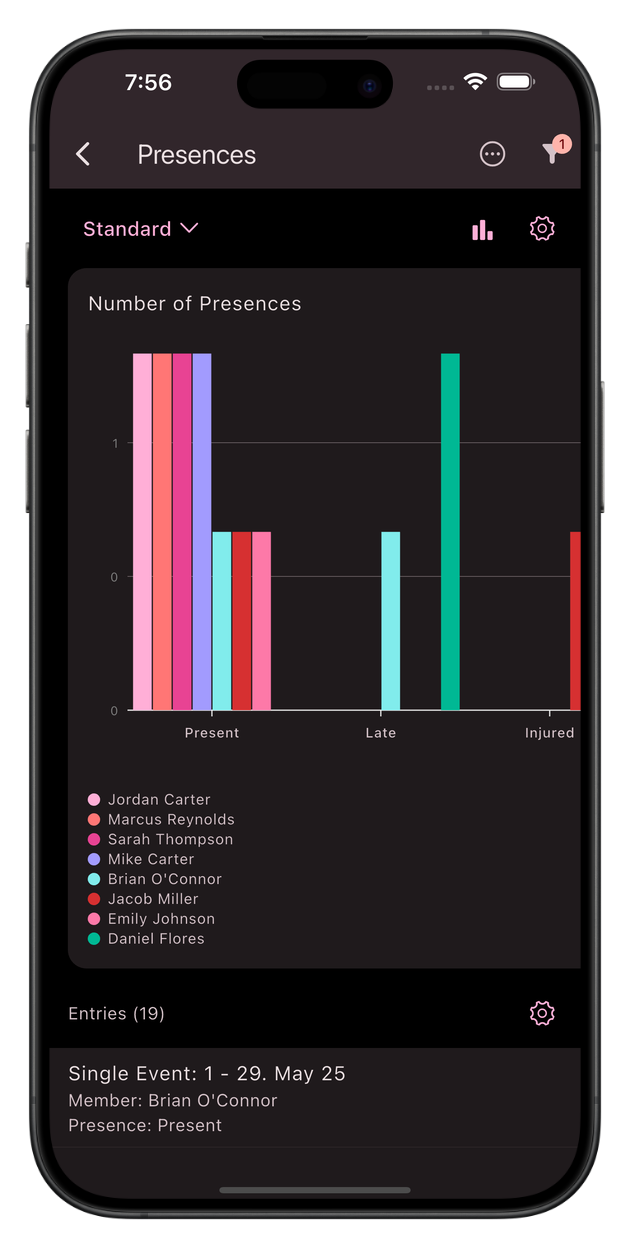
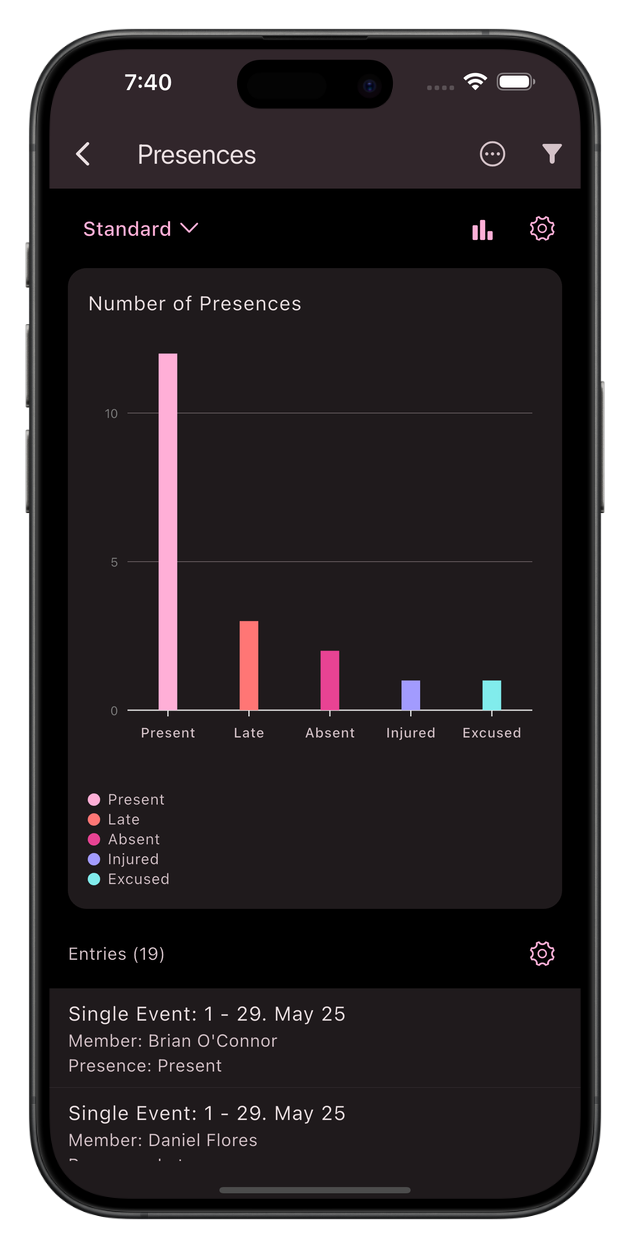
Everything comes together in one app: events, RSVPs, attendance, and statistics. No separate tool, no paper, no Excel. And it's all privacy-compliant with servers located in Germany.
Unypan
Done with paper lists and Excel chaos. With Unypan, you track your club members' attendance automatically, digitally, and privacy-compliant.